
Cold Email vs. Spam: What Are the Differences?
Cold email is sent to targeted prospects with intention, personalization and value while spam is sent randomly with no real target or personalization and usually non-compliant. Cold email is often confused with spam because both reach inboxes uninvited.
The key difference between cold email and spam lies in intent and execution. A cold email introduces, proposes, and requests attention from specific prospects who match your ideal customer profile. Spam email blasts, promotes, and dumps identical content on random addresses. One is a legal outreach method that starts meaningful conversations. The other risks blacklisting, penalties, and reputational damage. Five pillars that separate legitimate cold emailing from spammy emails are below.
- Personalization shapes each message to the recipient’s role, company, or challenges.
- Targeting focuses outreach on prospects with a genuine business reason to engage.
- Intent prioritizes starting conversations over pushing sales.
- Compliance follows regulations like CAN-SPAM, GDPR, PECR, and CASL through honest headers, opt-out options, and sender transparency.
- Sender reputation depends on authenticated domains, controlled volume, and low bounce rates.
A good cold email has a personalized subject line and opener, a specific value proposition, a low-pressure call-to-action, a real sender identity, and an unsubscribe link. A spam email usually contains a misleading subject line, hidden or fake sender details, no opt-out option, and aggressive sales language.
A good cold email copy doesn’t guarantee that you’ll land in the primary inbox. To avoid the spam folder follow the steps below.
- Take care of technical setups like SPF, DKIM, and DMARC authentication to protect your sender reputation.
- Warm-up inboxes to build trust with email providers.
- Verify lists to prevent bounces and spam traps.
- Control volume to avoid triggering filters.
- Write copies without spammy words to keep messages clean.
- Include clear opt-out options to prevent manual spam reports.
In this guide below you’ll understand the reasons behind spam reports, how to comply with CAN-SPAM requirements, GDPR rules to prevent spam complaints, find actionable steps for sales teams, SDRs, and B2B marketers to stay compliant and reach the primary inbox instead of the spam folder. Let’s start with the differences between cold email and spam in detail.
What Is Cold Email?
Cold email is a personalized message you send to a prospect without any prior relationship. Cold emails initiate a conversation around sales, partnerships, or networking opportunities. This initial outreach message targets a specific person based on their role, company, or problem context rather than broadcasting to random recipients. Below are the fundamental aspects of cold emails.
- Purpose: Cold emails generate leads, book meetings, and build professional relationships.
- Targeting: Cold emails target prospects matching your Ideal Customer Profile (ICP) based on job title, industry, or specific challenges.
- Structure: Cold emails are short, conversational, and aligned with recipient needs with a clear call-to-action (CTA).
- Legal compliance: Cold emails operate within CAN-SPAM, GDPR, and CASL frameworks by including accurate sender information and opt-out options.
Cold email is the primary B2B outreach channel for sales development representatives (SDRs) and business owners. Cold email works because it requests attention through relevance and transparency rather than volume, unlike spam.
What Is Spam Email?
Spam email is an unsolicited message sent in bulk to large, indiscriminate recipient lists without consent. These unwanted messages flood your email inbox regardless of whether you want them or have any relationship with the sender. The intent of the spam emails ranges from aggressive advertising to fraud and outright deception. Below are the key characteristics of spam email.
- Bulk sending to large numbers of recipients at once
- No consent or prior relationship with receivers
- Zero personalization in messages which feel generic and irrelevant
- Deceptive language designed to trick recipients into action
- Filter evasion through constantly changing tactics
The common types of spam email are below.
- Commercial/Marketing: Unwanted advertisements promoting products or services
- Phishing: Fake messages attempting to steal login credentials or financial data
- Scams/Hoaxes: Fraudulent offers promising money, prizes, or urgent help requests
- Malware Distribution: Emails containing malicious attachments or phishing links that install harmful software
Spam email creates the following serious risks for recipients.
- Phishing scams steal your credentials and expose private information.
- Malicious attachments infect devices with viruses or ransomware.
- Harmless-looking junk mail clutters inboxes and wastes time.
Spam-like behavior results in blacklisting because of these risks. Email providers block future messages entirely. Understand the differences between cold email and spam to avoid looking like spam.
What Are the Differences Between Cold Email and Spam?
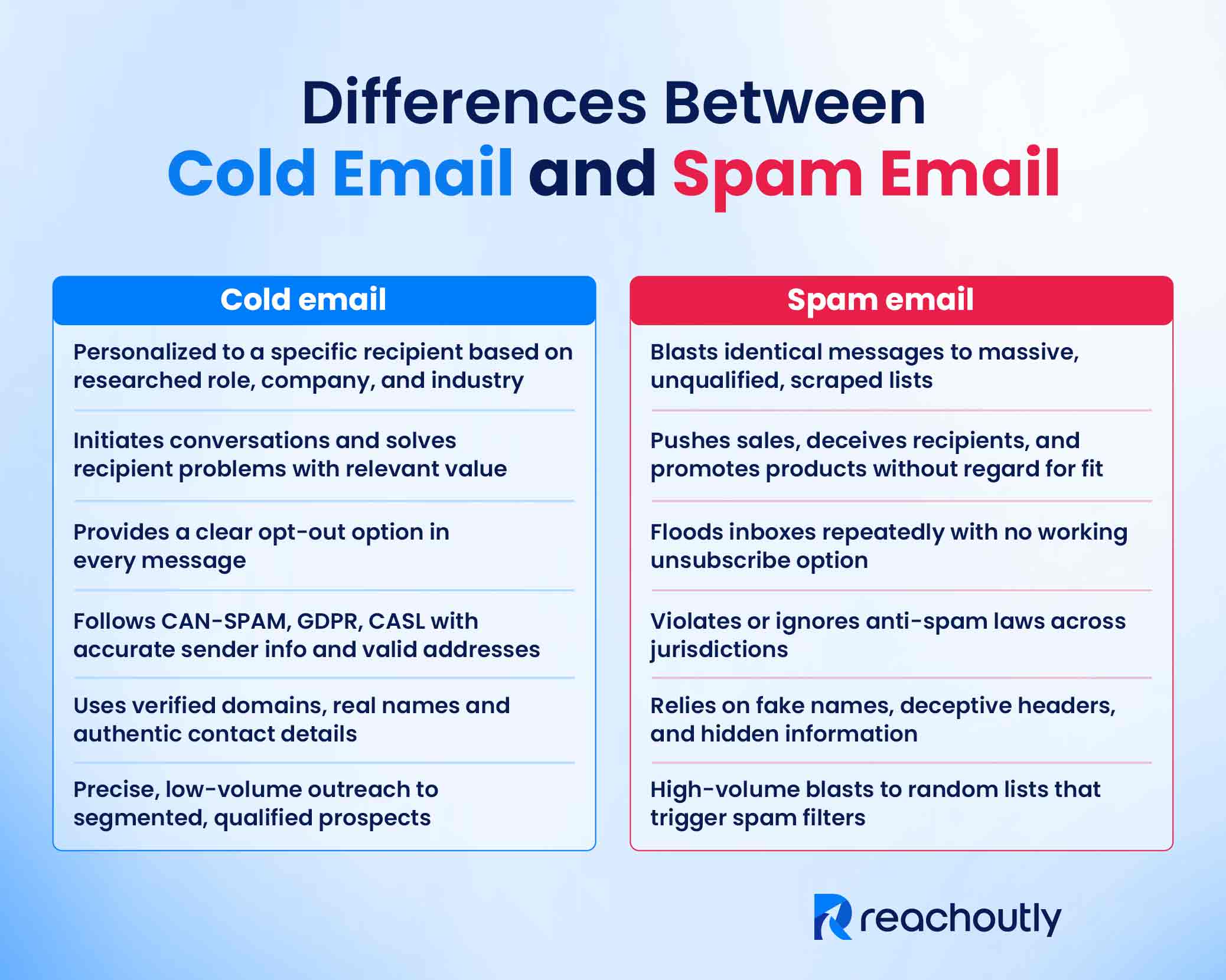
The differences between cold email and spam email are that cold email is targeted, compliant outreach with real intention and personalization, while spam is mass, generic sending that ignores consent. Both cold email and spam are unsolicited messages. They arrive in inboxes without prior relationship. But the purpose and the value offered are different. Below are the 6 most prominent differences between cold email and spam email in terms of preparation, purpose, approach, and compliance.
Targeting and Personalization
Cold emails are personalized to a specific recipient based on highly researched information. A sender studies the recipient’s role, company challenges, and industry context. The message addresses specific details relevant to that person’s work. Spam takes the opposite approach. It blasts identical messages to a massive, unqualified audience. Spammers purchase or scrape lists without verifying relevance. They send in bulk to thousands without knowing who receives the message.
Relevance and Intent
Cold email offers relevant, valuable, professional information to the recipient. Its purpose is to initiate conversations and build relationships over time. This buyer-centric approach focuses on solving the recipient’s problems. Spam email is product-centric and purely promotional. It pushes sales without regard for recipient needs. It includes spammy words. Spam often deceives the recipient. Many spam messages trick recipients into clicking malicious links or sharing personal data.
Consent and Opt-Out
Cold email acknowledges no prior relationship exists. The sender provides a clear opt-out option in every message. Recipients are able to unsubscribe with a single reply or click. Spam email ignores consent entirely. It floods inboxes repeatedly with no way to opt out. The unsubscribe options often don’t work, even when they exist.
Compliance and Legality
Cold emails adhere to laws like CAN-SPAM in the United States, GDPR in Europe, and CASL in Canada. These regulations require accurate sender identification, valid physical addresses, and functioning unsubscribe mechanisms. Violation of these laws results in penalties. Spam violates or ignores these rules. This makes spam illegal across jurisdictions where anti-spam laws exist.
Sender Identity and Trust
Cold email uses verified, professional domains with proper authentication. Senders include real names, company details, and contact information. Spam email relies on fake names, deceptive headers, and hidden sender information. Spammers mask their identity to avoid detection and accountability.
Volume and Distribution
Cold email operates as precise, low-volume outreach to segmented lists. Senders contact prospects who match their ideal customer profile. Spam relies on high-volume blasts to random lists. This triggers spam filters and gets flagged as malicious by email providers.
The differences between a relevant, professional conversation and spam email come down to intent and execution.
Why Is Cold Emailing Not Considered Spam?
Cold emailing is not considered spam because it follows legal guidelines, targets specific recipients, and provides genuine value. Spam fails all three conditions. Spam ignores laws, targets random addresses, and hides unsubscribe options. Cold email earns attention through honesty. Spam email demands it through deception.
The best practices of cold email differentiates it from spam. In a legitimate cold email, the sender discloses their identity and includes a valid physical address. Each email goes to a researched prospect with a relevant business reason. The subject line reflects the actual content inside. The intent focuses on starting a professional conversation, not blasting generic promotions to indiscriminate lists. The message contains a working unsubscribe mechanism. The volume stays low-to-moderate, not thousands at once.
What Does a Spammy Email Look Like Compared to a Good Cold Email?
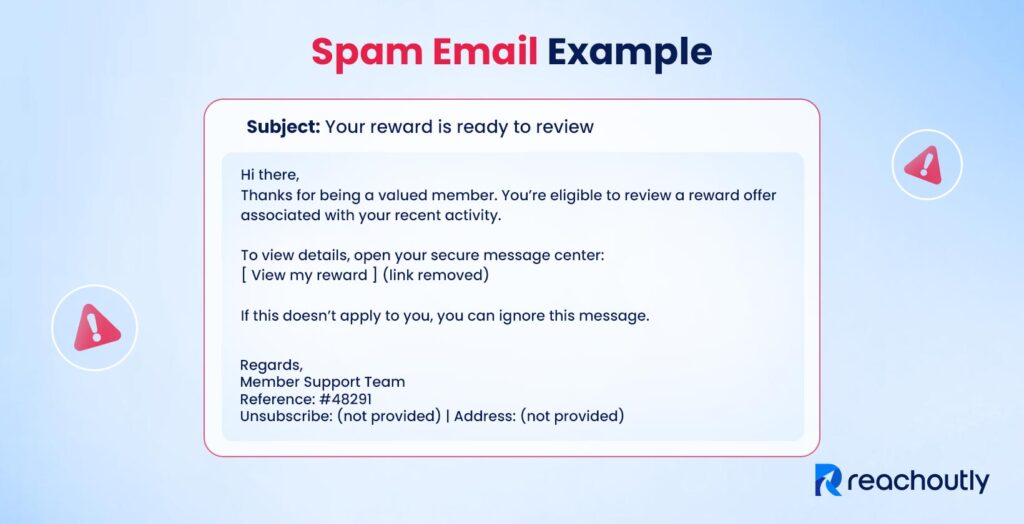
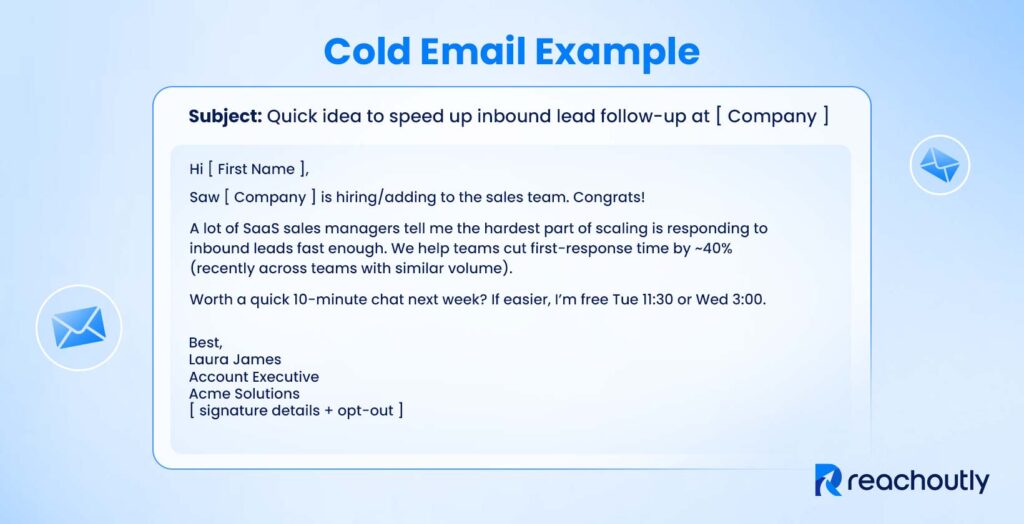
The main difference between a spammy email and a good cold email shows in subject line, opener, body, and CTA. Below is the comparison of a spam email against a good cold email to see this contrast clearly.
Below is an example of a sophisticated spam email.
Below is an example of a good cold email.
A good cold email can still end up in a spam folder. Focus on deliverability to avoid that. Below are the common signs that separate spam emails from good cold emails.
| Signs of a Spam Email | Signs of a Good Cold Email |
| Uses a generic subject line like “Limited offer just for you!” | References the recipient’s company or role in the subject line |
| Addresses “Dear Customer” or “Friend” | Opens with “why them, why now” |
| Promotes the product with exaggerated claims | Presents a clear value proposition tied to their situation |
| Includes words that trigger spam filters | Displays a real name, title, and signature |
| Hides or fakes the sender identity | Keeps the CTA low-pressure: “Open to a quick call?” |
| Buries the opt-out link or removes it entirely | Places a simple unsubscribe link in the footer for CAN-SPAM compliance |
How to Avoid Cold Emails Going to Spam?
Avoid cold emails going to spam by using SPF/DKIM/DMARC, warming your inbox, emailing verified prospects, controlling volume, simplifying content, and tracking bounces and complaints.
A well-written cold email can still land in the spam folder. Deliverability depends on several factors. These factors include authentication, sender reputation, list quality, and content. Spam filters weigh how you send, not just what you send. Below are 9 actionable strategies to avoid cold emails going to spam.
- Configure SPF, DKIM, and DMARC. SPF authorizes your sending servers. DKIM adds a digital signature to prove your email remains unchanged. DMARC ties both together and tells email providers how to handle failed checks. Align your sending domain with your tracking domain.
- Warm up your email account. A new domain or inbox lacks trust. Start by sending small amounts of emails to engaged recipients. Increase your volume gradually over 2-4 weeks. This process builds a positive history with email providers. Keep email warm-up running continuously for best results.
- Verify and clean your email list. Mailing lists lose about 22% of their addresses each year, according to HubSpot’s database decay research. Remove invalid, bounced, and inactive addresses before sending. Avoid purchased lists. Email providers place spam traps in these lists to catch senders who skip verification. Keep your bounce rates below 2%.
- Lower your daily volume. Spam filters flag unnatural sending patterns. Keep your sends under 150 emails per day per inbox. Avoid sudden spikes. Distribute sends across multiple inboxes and stagger your send windows during local business hours.
- Keep content simple. Use plain text or minimal HTML formatting. Limit links and images to one or two. Avoid spam trigger words like “free,” “guaranteed,” or “act now.” Excessive punctuation and ALL CAPS raise red flags.
- Avoid misleading subject lines. Match your subject line with your email content. Skip clickbait phrases and false urgency because majority recipients decide to open based on the subject line alone.
- Monitor your metrics. Track reply rates, bounce rates, and spam complaints. Aim for spam complaints below 0.1%. Pause and investigate, if deliverability drops. Run inbox placement tests before large campaigns.
- Include an unsubscribe option. A clear opt-out link prevents manual spam reports. Honor unsubscribe requests promptly. This protects your sender reputation and keeps you compliant with anti-spam laws.
- Test inbox placement. Use a deliverability tool like spam checker or Email Guard to check placement before you send at scale. These tools reveal whether your emails land in the primary inbox or spam folder.
Cold email copywriting, sending practices, and infrastructure all affect deliverability. Hire an end-to-end cold email outreach service provider like Reachoutly to handle these technical elements, if you’re struggling. Get high inbox deliverability and low spam complaints.
When Do Recipients Click “Report Spam” on Cold Emails?
Recipients click “Report spam” on cold emails when the email looks misleading, repetitive, too frequent, untrustworthy, or makes opting out difficult. A manual spam report happens when a recipient clicks “Report spam” or “Junk” in their mailbox. This single action damages sender reputation, trains spam filters, and affects domain-wide deliverability. Below are the most common triggers that cause recipients to hit the spam button.
- The email feels irrelevant. The recipient sees no connection between the message and their role, industry, or challenges. The sender did not research before reaching out.
- The subject line misled them. The subject promised one thing. The email delivered something else. Recipients feel tricked and react by reporting.
- The sender is unrecognizable. The “From” name or email address looks unfamiliar or suspicious. Recipients distrust messages from unknown sources.
- The emails arrive too frequently. Multiple follow-ups in a short period feel like harassment. Aggressive cadences annoy recipients instead of engaging them.
- There is no easy way to opt out. Recipients cannot find an unsubscribe link or a simple way to stop future messages. Reporting becomes their only option.
- The tone feels pushy or salesy. Overconfident language, false urgency, or aggressive calls to action make the email feel like a sales pitch rather than a conversation starter.
- The recipient never gave permission. Cold email does not require prior consent in many regions. But recipients who feel they never agreed to receive your message are more likely to report it.
The safest approach is prevention. Research your recipients before sending. Write honest subject lines. Space your follow-up emails. Include a clear opt-out. Respect signals of disinterest. Comply with other anti-spam laws. Monitor complaint signals in tools like Google Postmaster to catch problems early.
What Are the CAN-SPAM Requirements for Cold Emails?
The most critical CAN-SPAM requirements for cold emails are using truthful headers and subject lines, adding a physical address and easy opt-out, honoring opt-outs within 10 business days. The CAN-SPAM Act governs all commercial messages in the United States. This federal law applies to any email that promotes a product or service. Business-to-business messages are not exempt. Cold emails fall under these rules when they reach U.S. recipients. Below are the 6 core CAN-SPAM cold email requirements for staying compliant.
- Accurate header information. The “From,” “To,” and “Reply-To” fields in your email header accurately identify you or your business. Deceptive headers violate this rule.
- Honest subject lines. Your subject line reflects the actual content inside the email. Misleading subject lines trigger a violation.
- Identify the message as an ad. Promotional emails disclose their commercial nature. The Federal Trade Commission allows flexibility for relationship-building messages, but transparency builds trust.
- Physical address disclosure. Every message displays a valid physical postal address, such as a street address, registered P.O. Box, or a private mailbox.
- Clear opt-out mechanism. Recipients find an easy way to unsubscribe from future emails. A visible unsubscribe link works best.
- Prompt opt-out processing. You stop emailing within 10 business days, after someone opts out. Honor opt-out requests without charging fees or adding extra steps.
According to the Federal Trade Commission’s January 2024 inflation-adjusted guidelines, violations cost up to $53,088 per non-compliant email. Enforcement is complaint-driven, but the financial and reputational consequences are severe. Before sending cold emails to US recipients, read this guide on the legality of cold email to understand CAN-SPAM requirements and avoid penalties.
What Are the GDPR Rules for Cold Emailing vs. Spamming?
The GDPR rules include doing cold outreach under legitimate interest with transparency and a working opt-out. It treats deceptive, mass, non-consensual sending that ignores objections as illegal spam. GDPR applies when you send cold emails to EU residents. Cold outreach is possible under “legitimate interest,” but specific conditions apply. Spam emails violate GDPR outright and trigger severe penalties. Below are the GDPR rules for cold emailing.
- Lawful basis: Legitimate interest justifies B2B outreach when a genuine business reason exists and privacy impact remains minimal. B2C campaigns require explicit consent in most cases.
- Data minimization: Collect and store only business-relevant contact data. Avoid gathering excessive personal information.
- Transparency: Identify who you are, explain why you’re emailing, and disclose how you obtained their data if asked.
- Right to object: Recipients can opt out at any time. Honor objections promptly and delete their data.
- Working unsubscribe: Every cold email requires a clear, functional opt-out mechanism.
The following conditions make outreach spammy under GDPR.
- Deceptive subject lines or sender identity
- No unsubscribe option or ignored objections
- Mass marketing without consent
- No relevance or legitimate interest justification
- Spraying and praying to unverified lists
GDPR is stricter than CAN-SPAM. GDPR leans toward opt-in while CAN-SPAM allows opt-out models. Apply the higher standard, when targeting EU residents for cold email. GDPR fines can reach €20 million or 4% of global annual turnover, whichever is higher. Comply with the rules to protect both your sender reputation and your business.