
Cold Email Personalization That Gets Replies in 2026
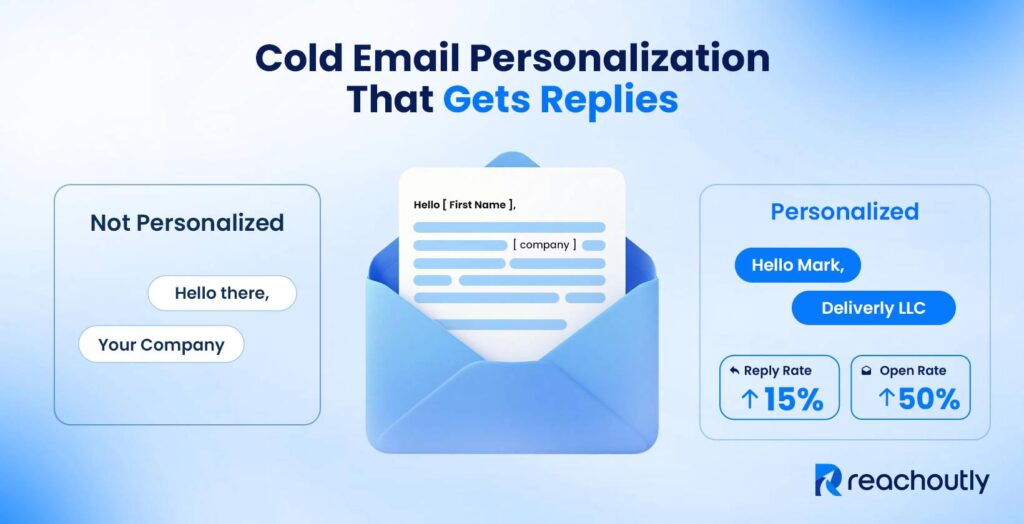
Cold email personalization makes every cold email you send read like a unique correspondence written for one recipient. It is the product of research, good copy, and smart automation.
Personalizing cold emails starts with the subject line. Short, specific, attention-grabbing subject lines break the pattern inside a crowded inbox. The opening line references one verifiable public signal about the prospect or their company. The relevance bridge turns that signal into a reason to care. The value proposition focuses on delivering real value and addressing the prospect’s specific needs as an outcome, not a feature list. The CTA closes the loop with a single, low-effort question. Each part plays a specific role in moving the prospect closer to a reply.
No single tool handles every part of cold email personalization. The right stack is a combination of 2 or more tools, for example, Clay, Smartwriter.ai, Instantly.ai, Lemlist, Apollo.io, and Lavender. These are the best tools for AI research and icebreaker generation, outreach sequencing, data enrichment, and deliverability.
Cold email specialists now use AI to create highly personalized cold emails at scale by automating research and first drafts that once took 5–10 minutes per prospect, and it’s the same approach we use at Reachoutly. AI handles enrichment, signal extraction, and first-draft generation. Human review catches hallucinations, forced phrasing, and tone mistakes. The strongest cold email teams treat AI as a co-pilot, not a replacement.
Effective cold email personalization techniques tie all of these steps into a repeatable system. This guide covers the specific B2B personalization techniques that produce the highest reply rates and meeting booking rates, the metrics that reveal whether your personalization is working.
What Is Cold Email Personalization?
Cold email personalization is the practice of customizing each outreach message using public, relevant data about the recipient’s company, role, or recent activity to increase trust, relevance and reply rates.
Cold email personalization makes every cold email you send tailor-made for each prospect. Cold email personalization focuses on delivering real value and addressing the prospect’s specific needs. Its goal is not generic customization, but meaningful relevance.
Cold email personalization is not inserting “First Name” and “Company Name” into a template. You need to go beyond adding surface level details. Be careful when personalizing cold email because poor personalization without relevant signals kills reply rates.
Cold email personalization increases reply rates and meeting booking rates when built around relevant, timely signals. Cold email personalization exists across the following 4 distinct levels.
- Basic / Merge-tag level: You insert first name, company, and job title through variables.
- Segment level: You group emails by industry, persona, or company size. The core message stays the same, but pain points and proof points adjust per cohort.
- Signal level: Your opening line or value proposition references a timely trigger, for instance, a LinkedIn post, a funding round, a new hire, or a product launch.
- Deep research / BASHO level: Your entire email is built around a single prospect’s context. It is reserved for high-value accounts where the deal size justifies that time investment.
Though cold email personalization increases response rates and helps close more deals, over-personalization can backfire. Referencing family photos, weekend plans, or non-public location data makes prospects feel watched, not valued. Fake personalization causes the same damage. AI-generated lines like “I loved your incredible journey building “Company name” read as empty flattery. Prospects can tell the difference between a template and a cold email written for them, by just looking at the cold email.
What Do Personalized Cold Emails Look Like?
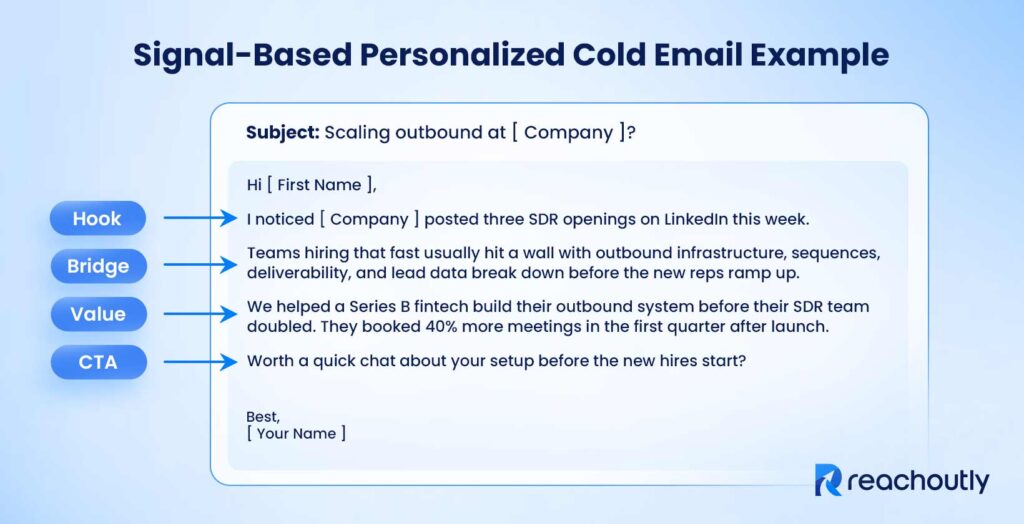
Personalized cold emails stay under 125 words using one timely signal, one clear outcome, and one low-friction CTA to increase open and reply rates. A personalized cold email is short, structured, and intentional. Every personalized cold email follows the same four-part structure as below.
- A personalized hook earns the reader’s attention.
- A relevance bridge connects that hook to a likely pain point.
- A value statement shows what you can do about it.
- A single, low-friction CTA closes the email.
A signal-based personalized cold email (hiring trigger) looks like below.
A weak vs. strong opener looks like below.
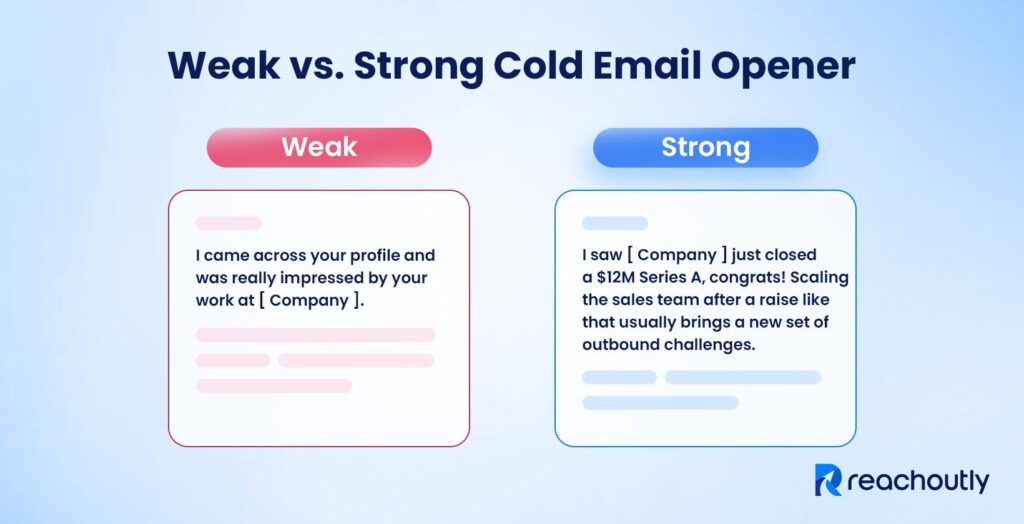
The weak cold email opener fails the “why me, why now” test. It applies to anyone. The strong cold email opener references a specific, timely event and connects it to a real challenge. Below are five core components of a personalized cold email.
- Subject line tied to the recipient’s role or situation
- Opening line referencing one real, public signal
- One-sentence bridge connecting the signal to a problem
- Value statement framed around an outcome, not a feature
- Single low-effort CTA phrased as a question
Mistakes in personalizing cold email leave a bad impression and kill engagement. Common personalization mistakes include talking about yourself in the opener, using vague compliments, writing long paragraphs, and using industry jargon. Each of these mistakes breaks the one rule that matters. Keep the email about them, not about you.
How to Personalize Your Cold Emails?
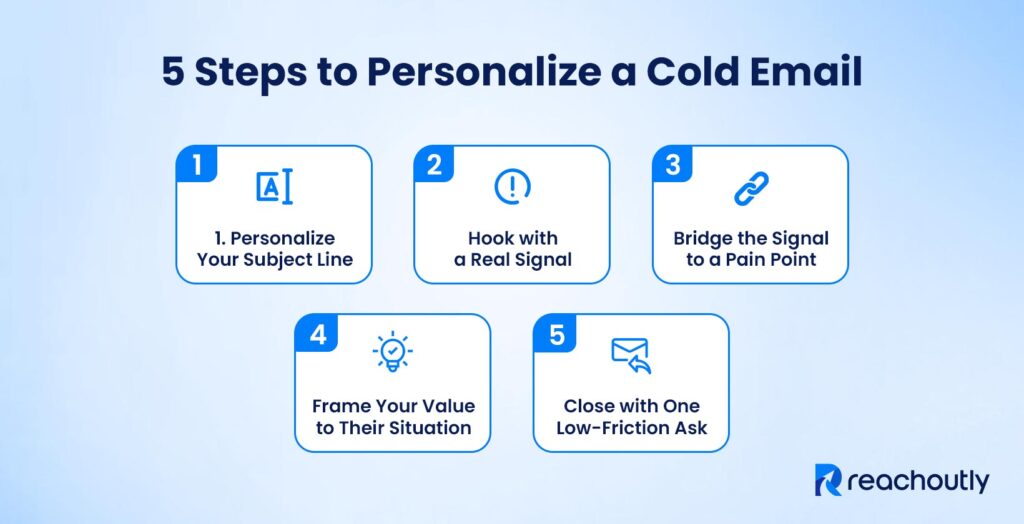
Personalize cold emails by using one recent signal, one clear pain point, one measurable outcome, and one low-friction CTA in a message under 125 words. Cold email personalization happens in every part of the email. Each part moves the prospect closer to a reply. Here is how to personalize each part of a cold email.
Personalize Your Subject Line to Boost Open Rate
A personalized cold email subject line breaks the pattern inside a crowded inbox. It signals that this message is not mass outreach. The best subject lines are 3-7 words. Use short, specific, and relevant subject lines. Use these approaches to write personalized subject lines that get opened.
- Reference the prospect’s company or a recent event (e.g., “[ company ]’s outbound after Series B”)
- Ask a question tied to a known pain point (e.g., “Scaling SDR team too fast?”)
- Use lowercase with no punctuation. It mimics how colleagues write internally and feels less like marketing
- Avoid spam-trigger words like “free,” “guaranteed,” “urgent,” or “limited time”. These words lower open rates and flag inbox filters
A personalized subject line does not sell your offer. It earns the open. Get that right, and the rest of your email gets a chance to do its job.
Customize Opening Line Using Real Signals to Hook the Prospect
A strong cold email opener references one specific, verifiable, public signal about the prospect or their company. A strong signal is recent, connects to what you sell, and fits in one sentence. Generic praise like “I love what you’re doing at [ Company ]” tells the recipient nothing. A real signal tells them you did actual research. Spend 2-3 minutes finding this detail before writing. That small investment separates your email from the dozens of template-based messages in their inbox. Use the approaches below to personalize the opening line.
- Reference a LinkedIn post or comment (opinions they shared, announcements they made)
- Check their job postings (what they are hiring for reveals their current priorities)
- Use recent company news (funding rounds, product launches, market expansion)
- Spot a tech stack change (tools they use or recently adopted that relate to your offer)
- Pull a quote from a podcast or interview appearances (positions they took publicly)
- Name a mutual connection or shared community (a warm bridge between strangers)
One strong signal beats five weak ones. Pick the detail that connects most directly to the problem your offer solves. Build your opening line around that single point.
Bridge the Signal to a Pain Point in the Email Body
The relevance bridge is the sentence in cold email that turns a signal into a reason to care. This sentence follows a pattern, “I noticed you’re [ signal ]. Teams at that stage usually face [ pain point/challenge ].” The bridge is the “why now” half of the equation. The signal becomes a flat compliment with no direction without it. A hiring signal without a bridge sounds like congratulations. A hiring signal with a bridge sounds like, “Noticed you’re adding three SDRs, teams scaling outbound that fast usually hit infrastructure bottlenecks before the new reps ramp up.” That sentence earns the next line. Use the following approaches to personalize the pain point.
- Connect a funding signal to a growth pain (e.g., “Post-Series B teams often outspend on headcount before fixing the pipeline”)
- Connect a leadership change to a strategic pain (e.g., “New VPs inherit broken processes before they can build new ones”)
- Connect a product launch to a go-to-market pain (e.g., “Most teams launch without a repeatable outbound motion in place”)
One bridge sentence does more work than three sentences of product description. Write it before anything else.
Frame Your Value Proposition to the Prospect’s Situation
The value statement in your cold email connects your offer to the pain point you just mentioned. Frame it as an outcome, not a feature list. “We helped a Series B fintech double their booked meetings in 90 days” beats “We offer a multi-channel outreach platform with AI sequencing.” Prospects respond to results, not product descriptions. Use the following approaches to personalize your value proposition.
- Match the outcome to the prospect’s current stage (e.g., early-stage teams care about speed, enterprise teams care about process)
- Use a real metric from a similar company to make the claim credible (e.g., “Helped a 20-person SaaS team cut ramp time by 40%”)
- Name the industry or role when referencing past results (e.g., “worked with three Series B sales teams” beats “worked with companies like yours”)
- Drop feature language entirely. Replace every “we offer” with “our clients see” or “teams using this get”
A value statement earns trust when it sounds like a result and reads like proof. Keep this to 1-2 sentences. This is not a pitch deck. It is a reason to reply.
End with a Single, Low-Friction CTA
A single CTA outperforms multiple asks because it removes decision fatigue. Frame the CTA as a question, not a command. Low-effort asks like “Worth exploring?” or “Open to a quick chat this week?” convert better than high-commitment requests like “Book 30 minutes on my calendar.” Use the approaches below to personalize your CTA.
- Tie the CTA directly to the pain point you raised earlier (e.g., “Hitting this wall right now?” beats “Want to connect?”)
- Mirror the prospect’s language. If their LinkedIn post used the word “pipeline,” use it in the CTA too
- Reference their role when relevant (e.g., “Is this something you’re owning right now?” works better for decision-makers than junior contacts)
The CTA closes the loop the subject line opened. Keep it light, keep it one ask, and let the prospect lead the next step.
What to Avoid When Personalizing Cold Emails?
Cold email personalization mistakes damage reply rates faster than no personalization at all. Always avoid the following list of cold email personalization mistakes.
- Forced or fake compliments: AI-generated praise with no substance (e.g., “Your incredible work at [ Company ] is inspiring”) gets ignored instantly.
- Non-public or personal information: Referencing family details, location tracking, or private social media content feels invasive and breaks trust immediately.
- Long emails packed with personalization: Writing more to “fit in” extra personal details backfires.
- Multiple personalization points that dilute focus: One strong, relevant signal outperforms three weak ones. Overloading the email with research looks desperate, not thoughtful.
- Generic templates with only a name swapped in: A [ First Name ] merge tag is not personalization. Recipients see through this instantly.
- Repeating the same follow-up angle after no reply: Each follow-up needs a new proof point or a different value angle. Sending the same message again adds nothing and signals laziness.
Personalizing a cold email manually takes considerable time. Use a proper technology stack to maintain good quality at a higher send volume.
What Are the Best Tools for Cold Email Personalization?
The best tools for cold email personalization include Clay, Apollo.io, ChatGPT, Smartwriter.ai, Instantly.ai, Lemlist, and Lavender. Cold email personalization depends on a stack of tools, not a single platform. Most important categories are AI research and icebreaker generation, data enrichment, copywriting and creating variations. No single tool covers all four. The right combination depends on your sending volume, budget, and channel mix. Below is a breakdown of the top tools by category for cold email personalization.
Clay for Signal Research and Data Enrichment
Clay is best for cold email specialists building custom enrichment workflows and piping real-time signals into their email sequences or CRM. Clay pulls prospect signals from over 150 data sources, including LinkedIn, company websites, job boards, and funding news. Its AI agents (called Claygent) research leads, summarize company pages, and draft personalized opening lines inside a no-code spreadsheet interface. Clay’s paid plans start at $149 per month (billed annually).
Apollo.io for Prospecting and Basic Personalization
Apollo.io is best for teams that want prospecting and outreach in one login without stitching together separate tools. Apollo.io combines a B2B contact database of over 275 million contacts with built-in outreach sequencing. It lets you filter prospects by industry, job title, company size, tech stack, and more. The platform handles basic personalization through text variables and an AI writing assistant that generates context from lead data. Apollo’s paid plans start at $49 per user per month (billed annually).
ChatGPT for Copywriting and Icebreaker Generation
ChatGPT generates personalized cold email copies, subject lines, and icebreakers from prospect data you feed into prompts. Sales teams use ChatGPT to turn LinkedIn bios, company details, and hiring signals into context-aware opening lines. It works best as a drafting assistant, every output needs a human review for tone, accuracy, and brand voice before sending. ChatGPT’s paid plans start at $20 per month for ChatGPT Plus.
Smartwriter.ai for AI-Generated Icebreakers
Smartwriter is best for cold email teams that need high-volume first-line generation without manual research per lead. Smartwriter.ai scrapes public data from LinkedIn profiles, company websites, and online activity, then produces custom icebreakers for each prospect. AI-generated lines still need a human quality check before sending. Smartwriter’s paid plans start at $49 per month (billed annually).
Lavender for Email Coaching and Optimization
Lavender is a real-time email writing assistant that scores your drafts on readability, tone, length, and personalization quality. The tool flags when emails run too long, sound too generic, or are likely to underperform. Plans start at $27 per month for the Starter tier. Pair Lavender with a research or enrichment tool like Clay, then use Lavender to polish the final draft before it goes out.
Lemlist for Image and Video Personalization
Lemlist pioneered dynamic image and video personalization in cold email. Lemlist lets you embed a prospect’s name, company logo, or screenshot directly into visual elements inside the email. This visual pattern-breaking approach adds a response lift, especially in creative, agency, and design-focused outreach. Lemlist’s paid plans start at $55 per month (billed annually).
Instantly.ai for Outreach Sequencing and Deliverability
Instantly.ai includes built-in warm-up, inbox rotation, and multi-step sequence management. Personalization inside Instantly works through variables and spintax which are text variations that make each email unique to inbox filters. Instantly’s paid plans start at $37 per month (billed annually). For signal-based personalization, pair Instantly with an enrichment tool like Clay to feed real prospect data into your sequences.
No single tool handles every part of cold email personalization. Build your stack around your volume and budget, and add tools as your process matures. Integrating AI to handle higher capacities for automating deep research to personalize better.
How Does AI Help You Personalize Cold Emails at Scale?
AI personalizes cold emails at scale by automating research and first-draft writing. Personalizing a single cold email took 5-10 minutes of manual research per prospect before AI. AI tools can now collect and analyze a prospect’s digital footprint, such as LinkedIn activity, company news, job postings, tech stack changes, extract the most relevant signals, and generate a personalized snippet for each prospect. That snippet is the opening line or subject line that you insert into a proven template through variables. This workflow makes it practical to send personalized cold emails to hundreds or thousands of prospects per campaign. Below is the practical AI personalization workflow that follows all five steps.
- Build your prospect list with ICP filters. Define your ideal customer profile by industry, role, company size, and any buying signals that match your offer.
- Enrich each prospect with public signals. Use a tool like Clay or Smartwriter.ai to pull LinkedIn posts, hiring data, recent funding rounds, and company news for every prospect on your list.
- Use AI to generate a personalized snippet per prospect. Produce a custom first line or subject line based on the enriched data. The best prompts instruct the AI to reference one specific signal and connect it to a relevant pain point.
- Insert snippets into a proven email template via variables. Drop the personalized first line into a template that already has a tested relevance bridge, value statement, and CTA.
- QA a sample batch before launch. Review at least 10-15% of generated snippets for factual accuracy, tone, forced praise, and hallucinated claims before sending the full campaign.
AI personalization without quality assurance is a liability, not an advantage. The most common AI failure is hallucinating achievements or events that do not exist. Do a QA checklist before every send that covers four checks. Verify the claim references a real, public event. Remove vague adjectives that add no information. Confirm snippet diversity across the batch so no two emails read the same. Consumers can identify AI-generated cold emails. So quality control is the difference between personalization that works and personalization that backfires.
What Are the Pros and Cons of AI vs. Human Cold Email Personalization?
The pros and cons of AI vs. human cold email personalization are below.
| AI Personalization | Human Personalization | |
| Pros | Processes hundreds of prospects in minutes | Catches tone, timing, and relationship dynamics that AI misses |
| Delivers consistent output across every email in a campaign | Produces stronger deep-research emails for high-value targets | |
| Scales icebreaker generation without adding headcount | Naturally varied writing avoids spam-filter pattern detection | |
| Pulls signals from multiple data sources in a single pass | Handles ambiguous or mixed signals with creative interpretation | |
| Cons | Hallucination risk remains high | Takes 5-15 minutes per email for quality research and writing |
| Repetitive phrasing patterns trigger spam filters | Quality drops at volume when reps are fatigued or rushed | |
| Struggles with nuance, humor, and cultural references | Expensive for large prospect lists because time cost adds up fast | |
| Every batch requires human QA before sending | Scaling beyond a few hundred emails per week is not realistic |
AI and human personalization cover different parts of the cold email workflow. They are not competing approaches. So, how do you combine AI and human review for cold email personalization? Treat AI as a co-pilot, not a replacement. Let AI handle enrichment, signal extraction, and first-draft snippet generation for the full prospect list. Then review a sample batch checking for factual accuracy, tone, and snippet diversity before the sequence launches. Write or heavily rewrite the full email from scratch for top-tier accounts (enterprise deals, strategic partnerships).
What Are the Best Practices for Cold Email Personalization?
The best practices for cold email personalization are to spend 2-3 minutes finding one strong signal, keep a 70/30 value-to-personalization ratio, prioritize relevance, segment by role/industry, and QA 10-20% of AI outputs. These practices make every cold email you send read like a unique, compelling correspondence written just for the recipient. Below is a list of cold email personalization best practices that Reachoutly’s cold email experts follow in real campaigns.
- Segment before you personalize. Group prospects by industry, role, and pain point first. Then add individual-level signals on top. Segmentation gives your template a relevant baseline. Signals make it feel one-to-one.
- Research before you write. Spend 2-3 minutes per prospect checking LinkedIn activity, company news, and job postings. A quick scan of their recent posts or press mentions gives you enough for a strong opening line. If you cannot find a usable signal, do segment-level personalization based on role or industry. It is better than forced personalization with no real substance.
- Use one strong signal per email, not three weak ones. A single specific reference (“Saw your team just opened a London office”) beats stacking generic observations. Focus creates clarity. Multiple signals dilute the message and make the email feel like a research dump.
- Prioritize relevance over flattery. “I noticed you’re hiring three SDRs” is relevant. “I love what you’re building” is flattery. Relevance answers the recipient’s question, “Why are you emailing me right now?” Flattery answers nothing and gets ignored.
- Keep the 70/30 balance. Roughly 70% of the email carries your core message. The other 30% is the personalized element. Personalization earns the reader’s attention. The core message earns the reply. Do not let personalization crowd out the reason you are reaching out.
- Write subject lines that belong in a colleague’s inbox. Short, specific, lowercase, no punctuation tricks. If a subject line looks like marketing, the recipient treats it like marketing.
- Keep emails under 125 words. Aim for 2-4 sentences and 5 sentences at the most. Every sentence earns the next one. Cut any sentence that does not move the reader closer to the CTA.
- QA every AI-generated batch. Review 10-20% of generated snippets before launch. Check for factual accuracy, repetitive phrasing, and forced compliments. One wrong claim poisons the entire campaign’s credibility.
- Vary your copy across the sending batch. Sending the same template to 500 inboxes triggers pattern detection by email service providers like Google and Microsoft. Use spintax, multiple template variants, or AI-generated unique lines to keep each email distinct and maintain inbox placement rates.
Keep in mind, the cold email personalization best practices mentioned above work as a system, not a checklist. In this system, segmentation sets the foundation, research finds the signal, the signal earns the open, the value proposition earns the reply, and QA protects the campaign’s credibility at scale. Skip any one step, and the others lose their impact. Master these fundamentals before deploying advanced B2B techniques.
Which Personalization Techniques Work Best for B2B Cold Email Outreach?
The personalization techniques that work best for B2B cold email outreach are trigger-based openers, timeline-based hooks, a “why you, why now” test, industry and role-matched value props, relevant social proof, deep research for high-value deals, and a low-friction closing question. The best B2B cold email outreach personalization techniques are as follows.
- Trigger-based openers. Reference a timely event to establish “why now.” Example events include a new role, a funding round, a product launch, or a hiring spree. Because timeline-based hooks outperform problem-statement hooks.
- “Why you, why now” framing. Every cold email answers two questions from the recipient’s perspective. Those are, why is this person emailing me, and why today? The signal is not strong enough if your email can’t answer both. This framing test filters out weak personalization before it reaches an inbox.
- Segment-level pain point matching. Tailor the value proposition by industry and role. A VP of Sales cares about pipeline velocity. A CTO cares about integration complexity. The same product needs a different angle for each buyer.
- Mutual connections or shared communities. Mentioning a shared connection, Slack group, or industry event builds instant trust between strangers. Use this technique only when the connection is genuine. Fabricated mutual ties destroy credibility faster than no personalization at all.
- Short, specific subject lines. “[ Company ]’s outbound” or “quick q about [ initiative ]” outperforms long, clever subject lines in B2B. Subject lines between 36 and 50 characters achieved the best response rates in Reachoutly’s cold email campaigns of 2025.
- Proof matched to the prospect’s situation. “We helped [ similar company in his space ] achieve [ specific result ]” beats generic social proof. Similarity is the deciding factor. A SaaS founder responds to SaaS proof. A logistics director responds to logistics proof. Matching industry and company stage makes the result feel reachable.
- BASHO-style deep research for enterprise targets. Invest 10-15 minutes per email for deals worth $50K or more. Reference specific strategic priorities, earnings call quotes, or published initiatives. This approach does not scale. But that is the point. The depth of research signals the seriousness of the outreach.
- Leverage AI to draft and scale personalization. Use tools like Clay to pull signals and Smartwriter.ai to generate opening lines. Then apply human review to catch errors, forced phrasing, and hollow compliments before sending. Let AI handle the volume and use human judgment to protect the quality.
Not every personalization technique fits every cold email campaign. Match the depth of personalization to the deal size and the prospect’s seniority.
How Do You Measure Whether Cold Email Personalization Is Working?
Measure whether cold email personalization is working by tracking positive reply rate, meeting booking rate, pipeline generated. Open rates tell you if your subject line works. Unsubscribe rate and spam complaints tell you about deliverability. Here’s how you can track the full chain from inbox to revenue.
- Reply rate (positive replies only). Total replies include “not interested,” “remove me,” and out-of-office responses. Positive reply rate is the real signal. These are replies that move toward a conversation.
- Open rate as a subject line diagnostic. Open rate measures if the subject line earns a click. The subject line or sender reputation needs attention, not the body copy, if open rates fall.
- Meeting booking rate. Meeting booking rate combines deliverability, targeting, personalization quality, and offer strength into a single efficiency number. Track this per campaign to see which combinations produce the best return on effort.
- A/B test personalized vs. segment-only vs. generic. Run controlled tests using the same list and the same offer with different personalization levels. This comparison proves whether the extra personalization effort is producing measurable ROI or just consuming time.
- Segment performance by industry, role, and signal type. Some segments respond better to certain signals than others. Break results down by segment to find what works where.
- Monitor negative signals. Unsubscribe rate, spam complaints, and “who are you/how did you get my email” replies are red flags. Rising negative signals mean your personalization feels either irrelevant, invasive, or obviously automated.
Cold email personalization that works shows up in positive reply rate first, then meeting rate. The problem is usually signal quality, not personalization effort, if those numbers are not moving. It means you are personalizing with the wrong data. If your cold email campaigns are not generating enough warm leads, try Reachoutly’s cold email outreach service. Reachoutly provides maximum campaign performance through appropriate signal and skillful cold email personalization.
What Is a Good Response Rate for Personalized Cold Emails?
A good response rate for personalized cold emails is 8-15% overall (about 5-10% positive replies) according to data from the Reachoutly’s cold email campaigns of the last six months of 2025. According to the same data, the average cold email reply rate sits between 1 and 5% across industries. Cold email campaigns with strong personalization, a clean list, and tight segmentation reach 8-15% total reply rate, with 5-10% positive reply rate. Top-performing campaigns with deep, signal-based personalization and narrow targeting reach 15-25% reply rates.A good response rate comes from using four levers. List quality comes first. A tight ideal customer profile, verified email addresses, and a bounce rate under 2% form the foundation. Personalization is the second. Timely and specific triggers outperform generic observations. Deliverability setup is the third. SPF, DKIM, DMARC (email authentication protocols) authentication, domain warm-up, and inbox rotation keep emails landing in primary inboxes. Follow-up cadence is the fourth. 3-5 follow-ups in a sequence capture replies that the first email misses. Read Reachoutly’s cold email response rate guide to learn more strategies for troubleshooting the underlying causes of low response rate and improving it.